


Why CrashPlan
For Microsoft 365 Archiving
Automatically archive inactive data
Choose what gets archived based on activity, data age, file size, or quotas.
Slow storage growth bloat
Typical growth of Microsoft 365 storage averages 20% per year.

Manage Your Data Lifecycle
Backup and archiving keep you within quota and ensure recoverability.
Meet Retention Requirements
Maintain compliance and long-term retention.

Self-serve
File Recovery
Instantly restore archived files within Microsoft 365.

Comprehensive Microsoft Coverage
Archive all the critical data your teams depend on every day: shared workspaces, mailboxes, files, and site content, while keeping storage costs controlled.

OneDrive

SharePoint

Exchange
Storage Overages Aren’t Inevitable
Even when it feels like they are
All active and inactive data is stored in Microsoft 365
You’re

Exceeding Microsoft storage limits
Buying additional storage
Failing at data cleanup campaigns
Paying exorbitant overages costs every renewal

Based on 800TB storage expansion.


Inactive data is automatically archived outside Microsoft 365
You will be

Automating archiving to keep Microsoft 365 storage within quota
Avoiding expansion purchases
Retaining Sharepoint, OneDrive, and Exchange data to meet retention and compliance needs

Loved by customers


The archiving solution that pays for itself
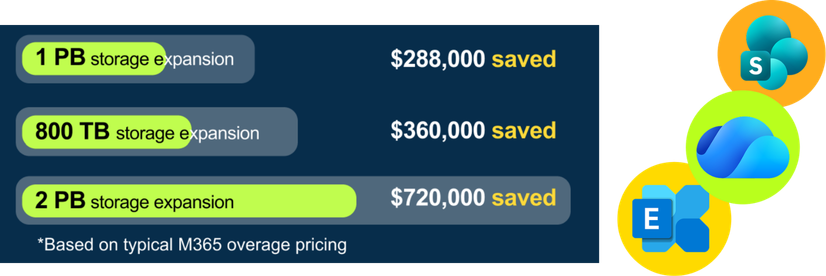
See how much your company could save on storage costs.
FAQ
How CrashPlan Archiving Works
1. How does CrashPlan archiving actually reduce Microsoft 365 storage costs?
Microsoft 365 pooled storage grows continuously, and once you exceed your included allotment, costs add up quickly. CrashPlan gives you a way to remove older, less frequently accessed data from Microsoft’s pooled storage while keeping it protected and available. By archiving eligible data, you reduce the amount of SharePoint and OneDrive storage counting toward Microsoft’s excess storage charges. Over time, this helps slow cost growth and gives you more control instead of reacting to Microsoft price increases.
2. How accessible is my archived data? Will archiving cause an inconvenience for users?
Archived data stays visible and usable for your users. When data meets the criteria you define in your policies, CrashPlan archives it and leaves a file stub in place. The file still appears in its original location, such as a SharePoint document library or OneDrive folder. If a user opens an archived file, it’s automatically restored from the CrashPlan archive. There’s no need for users to learn a new workflow and no requirement for IT to step in for routine access. From your perspective, archiving reduces storage pressure without increasing help desk tickets or operational overhead.
3. How does CrashPlan backup & archive support data resiliency?
Microsoft operates under a shared responsibility model, which means you’re still responsible for protecting your data. CrashPlan provides independent backup and recovery for Exchange Online, OneDrive, and SharePoint, in addition to archiving. If data is accidentally deleted, corrupted, or impacted by ransomware, you can recover it without relying on Microsoft’s limited native recovery options. You’re not just reducing storage costs—you’re reducing risk. Read our guide on SharePoint Online archiving cost benefits.
4. How does CrashPlan backup + archive support compliance?
If you’re subject to regulatory or legal retention requirements like FERPA or FISMA, deleting data isn’t an option—but keeping everything in Microsoft 365 is expensive. CrashPlan lets you retain data for as long as required without forcing it to stay in Microsoft’s pooled storage. Archived data remains encrypted and protected, and retention is governed by the policies you set. This allows you to meet compliance obligations without using Microsoft 365 as a long-term archive.
5. How do you charge for backup + archive?
CrashPlan is priced per user for you to backup and recover all your data in Exchange Online, OneDrive, and SharePoint. You have lots of choices in how you store your data, including Azure, CrashPlan’s data center, or bring your own storage. For a quote based on your company size and storage preferences, contact us for a personalized quote.


